
My Time With (Paid) AI

I've said my peace on AI in prior posts. I intensely detest its predication on widespread theft to be created in the first place. I dislike the notion of placing sovereignty in the hands of AI companies, be it personal, corporate, or national in nature. Its use in hiring practices is arguably the dumbest "innovation" since the ATS, and actively harming workers. How the robber barons in charge of these AI giants will never, ever bring utopia to the planet. That it's a blatant punishment for our willful naivety in trusting the monied elite and their lies of merit.
I've also experimented with it repeatedly. I've run local models, tweaked system prompts, made my RTX 3090 scream in agony as it's forced to crunch tokens for experiments of its utility and accuracy. I've also tried the cloud models - CoPilot, ChatGPT, Anthropic Sonnet - sparring with them in matters of policy, philosophy, even some code, and with milquetoast results at best. My opinion thus far has been that these things will change employment, yes, but they will not wholesale replace labor. Software development is undergoing its first major sea change in work since the first compilers made code portable, and abstract-able; AI threatens the ocean of mediocrity that infests technology solely seeking compensation instead of passion, and the truly passionate among us aren't exactly mourning the impending loss of our competition.
What I've never done, however, is pay for a model.
Until today.

This blog post is going to be more fluid than most. Rather than revise my thoughts over and over again, pruning and editing context for future me (and others, if they choose) to reflect on and digest, this will instead be very much "train of thought"/"stream of consciousness".
It will have errors. It will have mistakes. There will be stupidity, idiocy, and general negativity throughout. I will absolutely be a snarky bitch throughout. There will also (hopefully) be some surprises along the way, otherwise I'm out twenty-one dollars and change for bupkis and fully validated that this thing is stupid and overhyped.
So, y'know, be warned.
Project #1: Jellyfin
I have a home Plex server. I have a Plex lifetime pass. I do not like how restrictive, combative, and invasive Plex is becoming.
I also have a fresh, unmodified Talos K8s install on a small NUC, with an Intel GPU that works brilliantly for hardware transcoding.
Claude, put Jellyfin on my K8s node please.
I have a fresh Kubernetes cluster running on a single Talos Linux install. It has no other configuration applied to it other than basic network and hostname, and local kubectl on my Mac has been configured.
Acting as an infrastructure engineer, please write the necessary manifests to deploy Jellyfin within that cluster, with hardware acceleration/transcoding enabled and using two separate NFS shares for music and video content.  Any additional storage requirements should point to /volume/LAB01/{FOLDERNAME}, where {FOLDERNAME} describes the contents of said folder.  If ingress controllers or certificate managers are required for secure connectivity, create those as well and justify your choice of service for them.
Finally, make sure only the relevant ports for Jellyfin to function are opened or forwarded through the ingress controller's reverse proxy.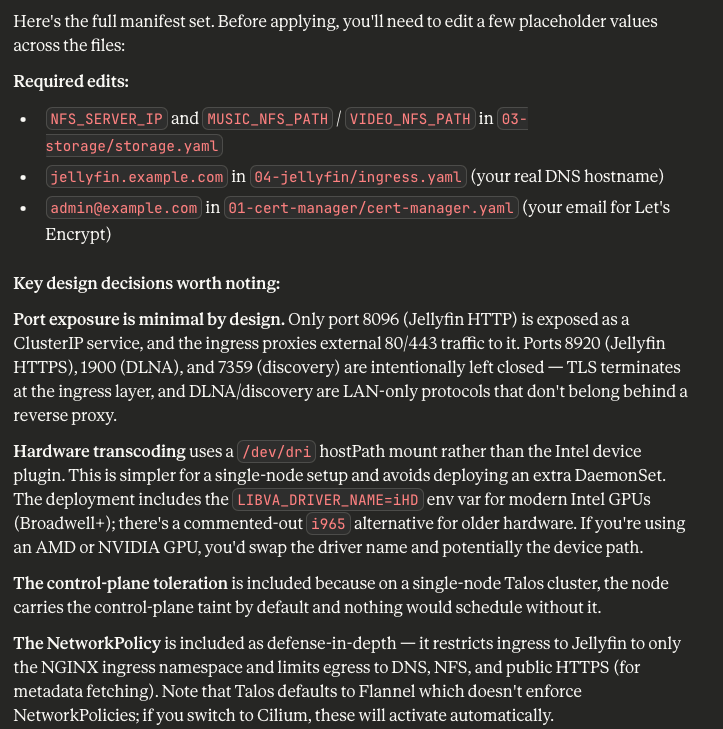
Observation: Verbosity Inspires Confidence
Claude - or specifically, Opus 4.6 - is incredibly verbose, but also keenly detailed. I gave it the most basic of information about the environment, and the variables I wanted to manually configure myself before deployment (so I don't share my internal infrastructure layout with Anthropic - best practice still applies to your homelab). It intuited that the control plane needed to be tainted to support the pod, my Talos config needed to expose my Intel GPU, I needed an ingress controller, and even justifies which ports are open or closed.
Which all sounds great! Except I'm no dummy, and I am not blindly applying this to a freshly baked Talos node. Let's comb through the documentation first, and - uh-oh, Claude Opus 4.6 throws some shade at the HAProxy folks:

Looking through its text output and everything seemingly makes sense: for a single K8s node with no workers or even a redundant control plane, a lot of this stuff is just plain overkill. It's not wrong, and truth be told I should just slap Linux on it with Cockpit on top and just write Podman manifests to burnish my Linux SysAdmin skills.
Observation: Human Context - and Experience - Still Wins
That's something Claude didn't do, despite the context: an experienced engineer would've looked at you strangely asking for this in the first place. Why the actual fuck are you deploying Kubernetes on a single node for production you colossal fucking dipshit?
Claude, while mean to the HAProxy people, would not be mean to me - or even attempt to steer me straight. The correct response to this insane request should've been a gentle but firm steering towards literally anything more sensible than this. Kubernetes just creates way too much scaffolding for a single node to really benefit from it when compared to KVM, or Docker, or Podman, or ESXi, or Hyper-V, or Illumos, or bhyve, or-
You get the idea. AI, trained to be helpful, will gladly help you do completely insane shit because it trusts your judgement in the instructions you give it.
On that note...
Observation: The Human Is Accountable
IBM said it best:
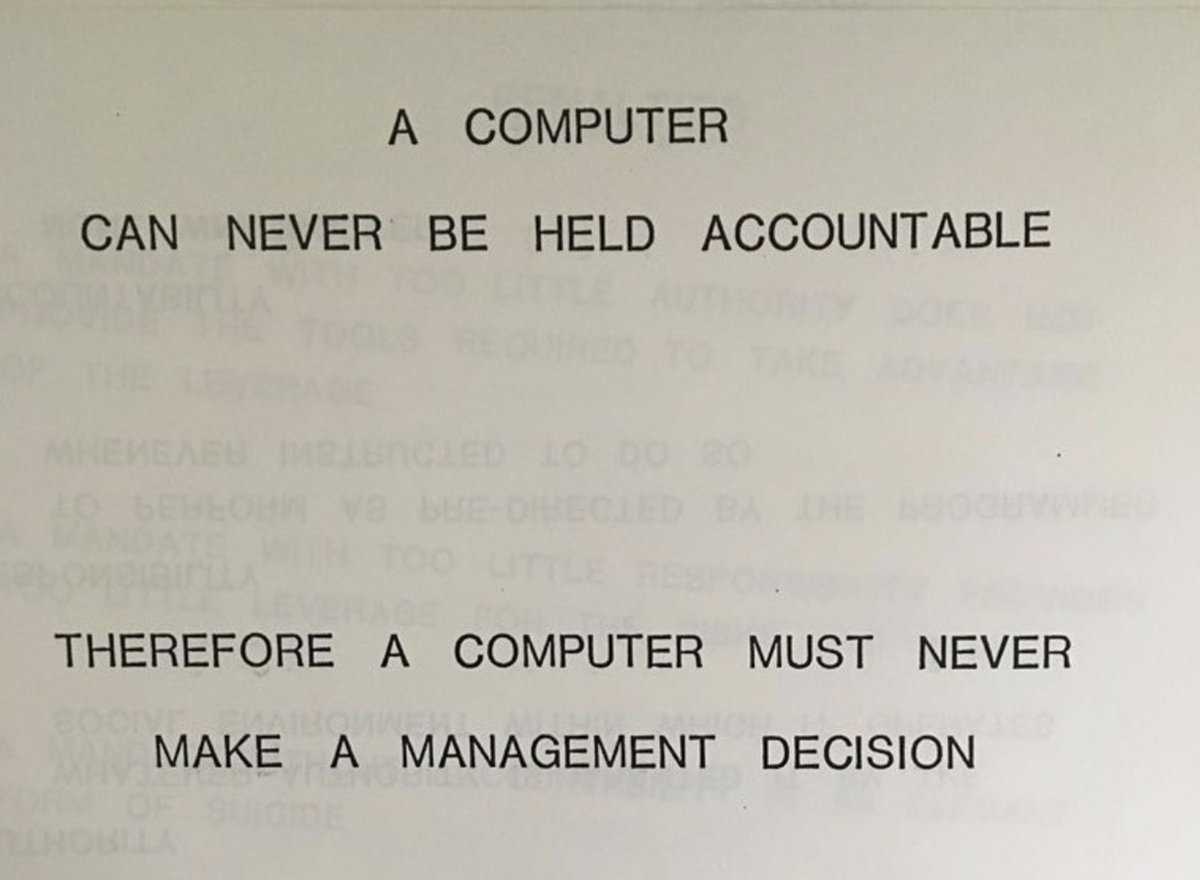
Claude spit out a bunch of output that reflected my ask; it has no way to tell me I'm being insane. This is applicable to all AI tools out there. A moderately competent human engineer would've stopped me; the AI lacks said context and experience, and thus it never can.
Incidentally, this is why they should stay the fuck out of weapons entirely. The decision to inflict damage simply cannot be left up to a machine, ever, period, full-stop.
Testing the Output
Opus 4.6 spat out several YAML files along with a Readme in Markdown. What it didn't do is provide any indication of what order they should be deployed in - or what configuration changes need to be made to Talos for all of them to work beyond basic comments, with the sole exception of the i915 kernel callout for talosconfig.
I want to stress that this Talos node has had nothing done to it beyond initially applying the automatically generated config from Talos' quickstart production guide. Nor am I going to really edit these outputs beyond required variables. I am simply going to review them to make sure I'm not deploying random bullshit, edit the necessary variables, and apply them.
First Issue: No Details on Patching Talos Node
Opus 4.6 was eager to callout a necessary change to my controlplane.yaml file for Talos, but not how to apply it. Again, the AI assumes implicit knowledge unless you explicitly ask for assistance; it does not know what you do not know. A human seeing such a build request might make the assumption you're being lazy instead of learning the new OS (in which case they'd be correct) and include more instructions; Opus 4.6 does no such thing.
One talosctl -n <IP> apply-config -f controlplane.yaml --talosconfig=./talosconfig later, and the control plane is patched.
Enough Stalling, kubectl apply -f That Shit!
Fine. For the sake of transparency, I'll include the raw outputs exactly as Opus 4.6 wrote them. No cheating, no kneecapping, no undermining the bot to get the results I want.
I am prepared to be wrong.
The Readme.md file from Opus 4.6 makes it clear exactly what order to deploy everything in:
# 1. Namespace
kubectl apply -f 00-namespace/

# 2. cert-manager (wait for pods to be ready before proceeding)
kubectl apply -f 01-cert-manager/
kubectl -n cert-manager wait --for=condition=Available deployment --all --timeout=120s

# 3. NGINX Ingress Controller
kubectl apply -f 02-ingress-nginx/
kubectl -n ingress-nginx wait --for=condition=Available deployment --all --timeout=120s

# 4. Storage (PVs, PVCs, NFS mounts)
kubectl apply -f 03-storage/

# 5. Jellyfin (Deployment, Service, Ingress, Certificates)
kubectl apply -f 04-jellyfin/
Well, almost clear. See, the filenames don't reflect the output of Opus 4.6. It has no context as to what it just created.
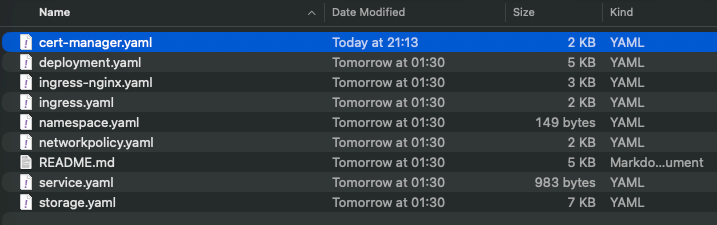
Weird, but not insurmountable. Even without the correct filenames, they're at least labeled in such a way that we can follow along to a degree.
First, the Namespace:
apiVersion: v1
kind: Namespace
metadata:
  name: jellyfin
  labels:
    app.kubernetes.io/name: jellyfin
    app.kubernetes.io/part-of: media-server
Easy enough, kind of hard to fuck up. I'm no Kubestronaut, but this looks fine to my newbie scrub eyes. On to the Cert Manager:
# cert-manager is installed via its official static manifest.
# This file documents the install command — the actual manifest is too large
# to vendor inline (4000+ lines). Apply it directly from the project:
#
#   kubectl apply -f https://github.com/cert-manager/cert-manager/releases/download/v1.17.2/cert-manager.yaml
#
# After applying, wait for readiness:
#   kubectl -n cert-manager wait --for=condition=Available deployment --all --timeout=180s
#
# Then apply the ClusterIssuer below.
---
# ===========================================================================
# ClusterIssuer: Let's Encrypt Production (HTTP-01 via NGINX Ingress)
# ===========================================================================
apiVersion: cert-manager.io/v1
kind: ClusterIssuer
metadata:
  name: letsencrypt-production
spec:
  acme:
    # IMPORTANT: Replace with your real email for expiry notifications
    email: admin@example.com
    server: https://acme-v2.api.letsencrypt.org/directory
    privateKeySecretRef:
      name: letsencrypt-production-account-key
    solvers:
      - http01:
          ingress:
            ingressClassName: nginx
---
# ===========================================================================
# ClusterIssuer: Let's Encrypt Staging (use this for testing first)
# ===========================================================================
apiVersion: cert-manager.io/v1
kind: ClusterIssuer
metadata:
  name: letsencrypt-staging
spec:
  acme:
    email: admin@example.com
    server: https://acme-staging-v02.api.letsencrypt.org/directory
    privateKeySecretRef:
      name: letsencrypt-staging-account-key
    solvers:
      - http01:
          ingress:
            ingressClassName: nginx
Obviously I need to replace the email field, so I did. Then there's the comments up top, where Opus 4.6 calls out that actually, cert-manager is installed slightly differently than I'm used to, so I better double-check.
Second Issue: Outdated Version
AI bots have training data cutoffs. Software does not. It iterates, improves, patches, and fixes frequently enough that a human knows to check for the latest version, read release notes, and understand what's changed.
Opus 4.6 does not. Thus why it eagerly suggests deploying cert-manager 1.17.2 instead of 1.19.2.
If all you're doing is trusting the output of AI bots blindly without actually verifying the contents, you will open yourself up to vulnerabilities. I can't believe I have to state this openly, but judging from the AI booster discourse blindly supporting charging forward with reckless abandon, I figured I may as well err on the side of caution.
Also of note, Let's Encrypt does not actually send notifications to the email field anymore.
Alright, let's use the updated command from cert-manager: kubectl apply -f https://github.com/cert-manager/cert-manager/releases/download/v1.19.2/cert-manager.yaml
NAME                                       READY   STATUS    RESTARTS   AGE
cert-manager-6dd9bdbd89-9pcnx              0/1     Pending   0          5m54s
cert-manager-cainjector-74bf7474d8-58wlh   0/1     Pending   0          5m54s
cert-manager-webhook-6f9f498c99-6xgqc      0/1     Pending   0          5m54s
I'll give you five guesses as to why they're stuck...
Third Issue: Missing Toleration
Type     Reason            Age    From               Message
  ----     ------            ----   ----               -------
  Warning  FailedScheduling  6m39s  default-scheduler  0/1 nodes are available: 1 node(s) had untolerated taint(s). no new claims to deallocate, preemption: 0/1 nodes are available: 1 Preemption is not helpful for scheduling.
  Warning  FailedScheduling  71s    default-scheduler  0/1 nodes are available: 1 node(s) had untolerated taint(s). no new claims to deallocate, preemption: 0/1 nodes are available: 1 Preemption is not helpful for scheduling.
Opus 4.6 neglected to have me clone the YAML file from cert-manager first and add the toleration to it needed to execute on the Control Plane. It also did not tell me how to do so after the fact.
To be fair, the cert-manager YAML file is over thirteen thousand lines long.
Thankfully Talos Linux comes to the rescue with a simple allowSchedulingOnControlPlanes: true flag for the controlplane.yaml config. Applying the configuration fixes the problem.
NAME                                       READY   STATUS    RESTARTS   AGE
cert-manager-6dd9bdbd89-9pcnx              1/1     Running   0          21m
cert-manager-cainjector-74bf7474d8-58wlh   1/1     Running   0          21m
cert-manager-webhook-6f9f498c99-6xgqc      1/1     Running   0          21m
Is running workloads on a Control Plane node dangerous? Yes, but Opus 4.6 refuses to stop me.
I modified the cert-manager.yaml file to include my correct e-mail, and applied it. Two secrets were successfully created, though whether or not they work is a different matter entirely...
NAMESPACE      NAME                                 TYPE                            DATA   AGE
cert-manager   cert-manager-webhook-ca              Opaque                          3      9m26s
cert-manager   letsencrypt-production-account-key   Opaque                          1      3m6s
cert-manager   letsencrypt-staging-account-key      Opaque                          1      3m5s
Alright, next up is the Ingress controller, for which Opus 4.6 pitched NGINX.
Fourth Issue: Uh...isn't NGINX Ingress retired?
Why yes, yes it is. Again, Opus 4.6 makes zero mention of this, instead justifying its decision in the Readme.md
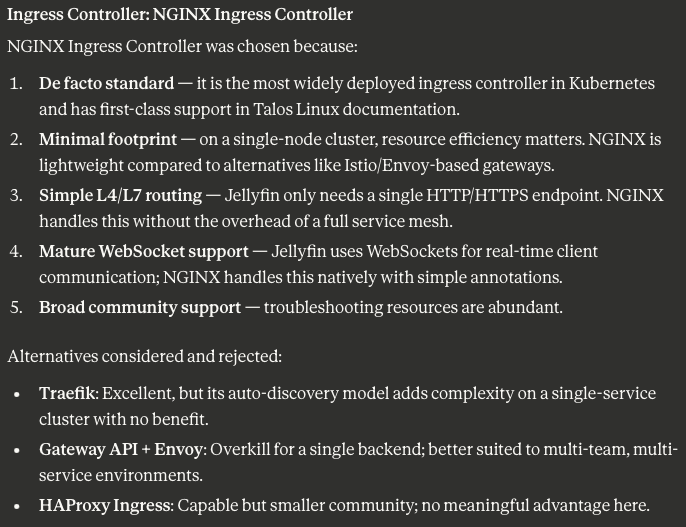
Kubernetes has moved away from Ingress Controllers to the Gateway API, the very thing Opus 4.6 rules out. If I were blindly applying this (which to be clear, I very much am!), I would not be aware of this fact.
This is now officially a reoccurring theme: training data cutoffs and lack of context means the models will make bad decisions only a human can ultimately stop. This is almost certainly a major contributor to AI-related fatigue and burnout: just like parents making sure their toddler doesn't stick a fork in the electrical sockets, developers and engineers have to make sure Opus 4.6 doesn't setup infrastructure that's already outdated or insecure.
Since I have no intention of (at time of writing, anyway) leaving this to stand in production, we're going to plow ahead. It's been ninety minutes of writing this blog post and checking AI output for something I could've done with a Docker Compose, and I am tired.
Applying NGINX...wait, which NGINX do I use, Opus 4.6?

The Elephant In The Room
Okay, at about this point I'd drag my junior into a conference room and coach them a bit on their lackluster output. Recommending outdated or deprecated products is a rookie mistake college should've beaten out of you, and dangerous behaviors like deploying pods on control planes is something you get from basic experience, but failing to label your fucking files properly? Come on, that gets you a disappointing glare from your senior (me) and an afternoon locked in learning mode as I both do the work and show you why your output was bad so you do better next time.
Except this is AI: it does not really learn from my coaching, and asking it to fix things is likely to muddy the waters further as I approach context window limitations. It's less coaching and more...
...yeah, that. It's brute force. It's banging rocks together until you get the desired output. It's my staunch refusal to learn something for myself being used to justify burning energy in a data center and offload my cognitive ability to a machine in perpetuity.
It's frustration masking as productivity. Code doesn't work? Re-prompt! Engineer your prompt. Manipulate your system prompt, add a skill, run the agent locally, create offline context windows to act as memory storage. It's adding layers of abstraction and crutches to help this thing - this admittedly powerful thing - succeed more often at doing your own job.
I just wanted Jellyfin, Claude. This is not that.
Less Bitching, More Patching
Fine, fine. Let me climb down from my soapbox and keep going through this, because I am genuinely curious if the actual code - issues aside - works. Looking through the code and with my limited understanding of K8s, I'm fairly sure it's ingress-nginx.yaml that it wants me to apply next.
# NGINX Ingress Controller is installed via its official Helm chart or static manifest.
# For a Talos Linux single-node cluster, the static manifest approach is simplest:
#
#   kubectl apply -f https://raw.githubusercontent.com/kubernetes/ingress-nginx/controller-v1.12.2/deploy/static/provider/baremetal/deploy.yaml
#
# After applying, wait for readiness:
#   kubectl -n ingress-nginx wait --for=condition=Available deployment/ingress-nginx-controller --timeout=180s
#
# NOTE: The baremetal provider manifest creates a NodePort service by default.
# The patch below converts it to LoadBalancer type if you have a load balancer
# solution (e.g., MetalLB) or you can keep NodePort for direct node access.
# On a single-node Talos cluster without MetalLB, NodePort is the pragmatic choice.
---
# ===========================================================================
# Optional: Patch the ingress-nginx-controller Service to use specific NodePorts
# so firewall rules are predictable. Apply AFTER the main manifest.
# ===========================================================================
apiVersion: v1
kind: Service
metadata:
  name: ingress-nginx-controller
  namespace: ingress-nginx
  labels:
    app.kubernetes.io/name: ingress-nginx
    app.kubernetes.io/component: controller
spec:
  type: NodePort
  ports:
    - name: http
      port: 80
      targetPort: http
      protocol: TCP
      nodePort: 30080
    - name: https
      port: 443
      targetPort: https
      protocol: TCP
      nodePort: 30443
  selector:
    app.kubernetes.io/name: ingress-nginx
    app.kubernetes.io/component: controller
---
# ===========================================================================
# ConfigMap: Harden the NGINX Ingress Controller
# Only relevant proxy settings — no extraneous ports opened.
# ===========================================================================
apiVersion: v1
kind: ConfigMap
metadata:
  name: ingress-nginx-controller
  namespace: ingress-nginx
  labels:
    app.kubernetes.io/name: ingress-nginx
    app.kubernetes.io/component: controller
data:
  # Security headers
  use-forwarded-headers: "true"
  enable-real-ip: "true"

  # Disable unused stream/UDP snippets to reduce attack surface
  use-gzip: "true"

  # WebSocket support (needed by Jellyfin)
  proxy-read-timeout: "3600"
  proxy-send-timeout: "3600"

  # Only allow HTTP and HTTPS — no raw TCP/UDP forwarding
  # (This is the default, stated explicitly for clarity)
  allow-snippet-annotations: "false"

  # Large media file uploads (e.g., subtitle files, images)
  proxy-body-size: "0"

  # SSL configuration
  ssl-protocols: "TLSv1.2 TLSv1.3"
  ssl-redirect: "true"
  hsts: "true"
  hsts-max-age: "31536000"
  hsts-include-subdomains: "true"
I know this song and dance from cert-manager. Let's just peak at that GitHub repo to see what the actual deployment manifest is...
kubectl apply -f https://raw.githubusercontent.com/kubernetes/ingress-nginx/controller-v1.14.3/deploy/static/provider/cloud/deploy.yamlSeriously, Claude, there are dozens of warnings not to do this.
...and applied.
NAME                                        READY   STATUS    RESTARTS   AGE
ingress-nginx-controller-7fdf8d9764-lbd2z   1/1     Running   0          52s
Then I apply the earlier YAML, and voila, Ingress controller deployed with the correct Service and ConfigMap.
It's worth noting at this point that not one of these tests have been called for by Opus 4.6. It's all my own experience reminding me to test your shit, dummy.
Next up is storage, and now we need to make sure we're modifying things correctly as the variables creep in.
Hard Blocker: Local PVs and PVCs
Here, Opus 4.6 goes off the rails. Despite my original prompt citing NFS for the media shares and stating any additional storage should be at a mount point, it assumes I meant the mount point is local, not NFS.
This is nuance that AI just does not appreciate. It requires the human to rework their explanation to be explicit rather than implicit. Now, for the first time thus far, I will prompt it to fix this.
Your storage.yaml file assumed I meant a local mount point, when in fact I implied all storage should use NFS via the /volume/LAB01 mounting point on an NFS server. Please update the YAML for that document to reflect this storage change.Claude Opus 4.6 takes some time to grind through the tokens and re-write the YAML.
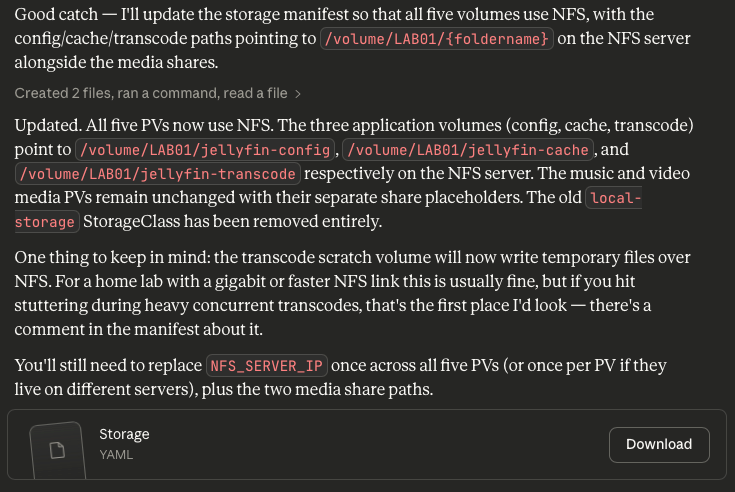
Now let's look at the YAML it generated.
Great Output, Bad Teacher
This was a key teaching opportunity for another engineer in how Kubernetes storage classes work. Instead of churning out entirely new YAML, a human could've instead taken the opportunity to identify the knowledge gap - "They know the storage class is wrong, but not how to make it right" - and teach the solution. Instead, I've got a brand new YAML file to blindly apply after making some basic changes, and no context as to what's changed unless I'm comparing the old and new documents myself.
For agents operating autonomously, this opportunity is gone entirely. The agent will keep banging rocks until it works.
After making the changes to the YAML file and applying it, the PVs and PVCs look fine.
NAME                    CAPACITY   ACCESS MODES   RECLAIM POLICY   STATUS   CLAIM                             STORAGECLASS   VOLUMEATTRIBUTESCLASS   REASON   AGE
jellyfin-cache-pv       20Gi       RWO            Retain           Bound    jellyfin/jellyfin-cache-pvc       nfs-storage    <unset>                          98s
jellyfin-config-pv      5Gi        RWO            Retain           Bound    jellyfin/jellyfin-config-pvc      nfs-storage    <unset>                          98s
jellyfin-music-pv       500Gi      ROX            Retain           Bound    jellyfin/jellyfin-music-pvc       nfs-storage    <unset>                          56s
jellyfin-transcode-pv   50Gi       RWO            Retain           Bound    jellyfin/jellyfin-transcode-pvc   nfs-storage    <unset>                          98s
jellyfin-video-pv       2Ti        ROX            Retain           Bound    jellyfin/jellyfin-video-pvc       nfs-storage    <unset>                          56s
...kinda. See, the storage capacity labels are...wrong, but Opus 4.6 doesn't have any indicators that this is a problem or needs to be changed accordingly. Fifty gigabytes is plenty for video transcodes, but I've got way more media than what video and music reference. That being said, since they're read-only instead of read-write, this might not be an issue.
We won't know for sure until Jellyfin is actually running. Speaking of which, the Readme.md file says it's time to actually deploy Jellyfin! Huzzah!
# ===========================================================================
# Jellyfin Deployment
# - Runs as a single replica (media server with local state)
# - GPU device passthrough for hardware-accelerated transcoding
# - All five volumes mounted (config, cache, transcode, music, videos)
# ===========================================================================
apiVersion: apps/v1
kind: Deployment
metadata:
  name: jellyfin
  namespace: jellyfin
  labels:
    app.kubernetes.io/name: jellyfin
    app.kubernetes.io/component: media-server
spec:
  replicas: 1
  # Recreate strategy prevents two pods from fighting over local PVs
  strategy:
    type: Recreate
  selector:
    matchLabels:
      app.kubernetes.io/name: jellyfin
  template:
    metadata:
      labels:
        app.kubernetes.io/name: jellyfin
        app.kubernetes.io/component: media-server
    spec:
      # Jellyfin needs access to /dev/dri for VA-API / QSV transcoding.
      # On Talos Linux, the node must have the i915 (Intel) or amdgpu (AMD)
      # kernel module loaded. See README for Talos machine config additions.
      #
      # We run as root (uid 0) inside the container because /dev/dri devices
      # are owned by root:video and the official Jellyfin image expects root.
      # The container is otherwise locked down via securityContext below.
      containers:
        - name: jellyfin
          image: jellyfin/jellyfin:10.10.6
          ports:
            - name: http
              containerPort: 8096
              protocol: TCP
          env:
            # Tell Jellyfin to use /cache and /transcode paths
            - name: JELLYFIN_CACHE_DIR
              value: /cache
            - name: JELLYFIN_CONFIG_DIR
              value: /config
            - name: JELLYFIN_DATA_DIR
              value: /config/data
            - name: JELLYFIN_LOG_DIR
              value: /config/log

            # Timezone — adjust to your locale
            - name: TZ
              value: America/New_York

            # Hardware acceleration environment hints
            # Intel QSV / VA-API
            - name: LIBVA_DRIVER_NAME
              value: iHD
            # Uncomment the line below for older Intel (Broadwell and earlier):
            # - name: LIBVA_DRIVER_NAME
            #   value: i965

          resources:
            requests:
              cpu: 500m
              memory: 1Gi
              # If using Intel GPU device plugin (intel/intel-device-plugins-for-kubernetes),
              # uncomment and use resource limits instead of volumeDevices:
              # gpu.intel.com/i915: "1"
            limits:
              cpu: 4000m
              memory: 4Gi
              # gpu.intel.com/i915: "1"

          volumeMounts:
            - name: config
              mountPath: /config
            - name: cache
              mountPath: /cache
            - name: transcode
              mountPath: /transcode
            - name: music
              mountPath: /media/music
              readOnly: true
            - name: videos
              mountPath: /media/videos
              readOnly: true
            # GPU device access
            - name: dev-dri
              mountPath: /dev/dri

          livenessProbe:
            httpGet:
              path: /health
              port: http
            initialDelaySeconds: 30
            periodSeconds: 30
            timeoutSeconds: 5
            failureThreshold: 3
          readinessProbe:
            httpGet:
              path: /health
              port: http
            initialDelaySeconds: 10
            periodSeconds: 10
            timeoutSeconds: 5
            failureThreshold: 3

          securityContext:
            # Required: Jellyfin needs to write to config/cache/transcode and
            # access /dev/dri devices. Privileged is NOT needed — we only need
            # the device to be mounted, which is handled by the hostPath volume.
            privileged: false
            readOnlyRootFilesystem: false

      volumes:
        - name: config
          persistentVolumeClaim:
            claimName: jellyfin-config-pvc
        - name: cache
          persistentVolumeClaim:
            claimName: jellyfin-cache-pvc
        - name: transcode
          persistentVolumeClaim:
            claimName: jellyfin-transcode-pvc
        - name: music
          persistentVolumeClaim:
            claimName: jellyfin-music-pvc
        - name: videos
          persistentVolumeClaim:
            claimName: jellyfin-video-pvc
        # GPU device passthrough — exposes /dev/dri from the host
        - name: dev-dri
          hostPath:
            path: /dev/dri
            type: Directory

      # Tolerate the control-plane taint since this is a single-node cluster
      tolerations:
        - key: node-role.kubernetes.io/control-plane
          operator: Exists
          effect: NoSchedule

      # Ensure stable scheduling on the single node
      restartPolicy: Always
      terminationGracePeriodSeconds: 30
This is actually some of the best K8s deployment manifest code I've ever read. I know YAML is supposed to be self-documenting to a degree, but actually having comments on the important stuff and justifications for a given decision are always welcome. There is one issue, though...
Versioning: the AI achilles heel
The deployment manifest specifically cited an older version of Jellyfin rather than the latest. Version control is important for the enterprise, but if all you're doing is vibe-coding infrastructure with AI, this is going to be a constant pain in the ass.
So, like with every prior deployment, we fix the thing Opus 4.6 shoved in for no good reason.
Let's apply it, since its current config should work according to Opus 4.6 on my N100 NUC.
Warning: would violate PodSecurity "restricted:latest": allowPrivilegeEscalation != false (container "jellyfin" must set securityContext.allowPrivilegeEscalation=false), unrestricted capabilities (container "jellyfin" must set securityContext.capabilities.drop=["ALL"]), restricted volume types (volume "dev-dri" uses restricted volume type "hostPath"), runAsNonRoot != true (pod or container "jellyfin" must set securityContext.runAsNonRoot=true), seccompProfile (pod or container "jellyfin" must set securityContext.seccompProfile.type to "RuntimeDefault" or "Localhost")...is anyone surprised by this?
Pod Security: Blocking Bad Decisions
This is actually good, because Kubernetes' built-in security controls have blocked us from doing several dangerous things involving escalated privileges and root access to hostPath devices (the iGPU specifically). It then blocks the deployment entirely.
Because I am genuinely trying to lean entirely on the AI, here, I'm going to offload debugging to it as well. Sure, I could spend several hours learning about namespace security policies, pod restrictions, and Kubernetes security controls...
...or I could bang some rocks together!
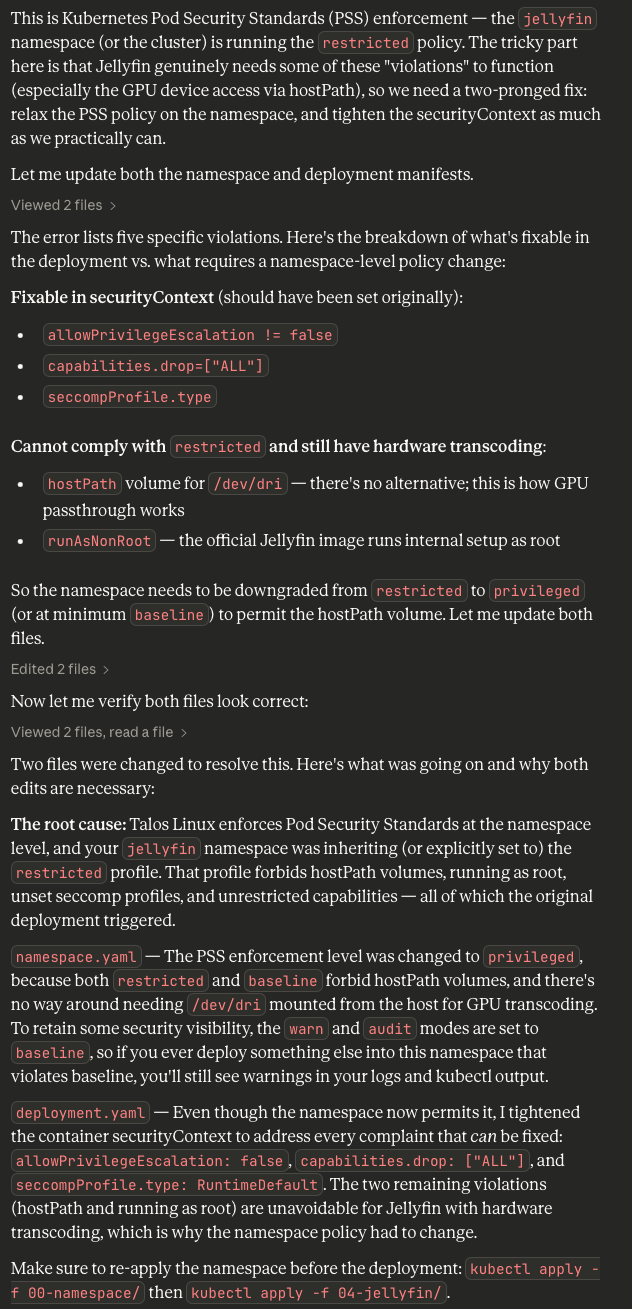
Alright, so now we have a new namespace.yaml file...
apiVersion: v1
kind: Namespace
metadata:
  name: jellyfin
  labels:
    app.kubernetes.io/name: jellyfin
    app.kubernetes.io/part-of: media-server
    # ---------------------------------------------------------------
    # Pod Security Standards (PSS)
    #
    # Jellyfin requires a hostPath volume for GPU device passthrough
    # (/dev/dri) and runs as root inside the container. Both of these
    # violate the "restricted" profile. The "baseline" profile also
    # forbids hostPath, so we must use "privileged" for enforcement.
    #
    # We set "warn" to "baseline" so that any ADDITIONAL pods deployed
    # into this namespace that violate baseline will still surface
    # warnings, giving visibility without blocking Jellyfin itself.
    # ---------------------------------------------------------------
    pod-security.kubernetes.io/enforce: privileged
    pod-security.kubernetes.io/enforce-version: latest
    pod-security.kubernetes.io/warn: baseline
    pod-security.kubernetes.io/warn-version: latest
    pod-security.kubernetes.io/audit: baseline
    pod-security.kubernetes.io/audit-version: latest
...and a new deployment.yaml file...
# ===========================================================================
# Jellyfin Deployment
# - Runs as a single replica (media server with local state)
# - GPU device passthrough for hardware-accelerated transcoding
# - All five volumes mounted (config, cache, transcode, music, videos)
# ===========================================================================
apiVersion: apps/v1
kind: Deployment
metadata:
  name: jellyfin
  namespace: jellyfin
  labels:
    app.kubernetes.io/name: jellyfin
    app.kubernetes.io/component: media-server
spec:
  replicas: 1
  # Recreate strategy prevents two pods from fighting over local PVs
  strategy:
    type: Recreate
  selector:
    matchLabels:
      app.kubernetes.io/name: jellyfin
  template:
    metadata:
      labels:
        app.kubernetes.io/name: jellyfin
        app.kubernetes.io/component: media-server
    spec:
      # Jellyfin needs access to /dev/dri for VA-API / QSV transcoding.
      # On Talos Linux, the node must have the i915 (Intel) or amdgpu (AMD)
      # kernel module loaded. See README for Talos machine config additions.
      #
      # We run as root (uid 0) inside the container because /dev/dri devices
      # are owned by root:video and the official Jellyfin image expects root.
      # The container is otherwise locked down via securityContext below.
      containers:
        - name: jellyfin
          image: jellyfin/jellyfin
          ports:
            - name: http
              containerPort: 8096
              protocol: TCP
          env:
            # Tell Jellyfin to use /cache and /transcode paths
            - name: JELLYFIN_CACHE_DIR
              value: /cache
            - name: JELLYFIN_CONFIG_DIR
              value: /config
            - name: JELLYFIN_DATA_DIR
              value: /config/data
            - name: JELLYFIN_LOG_DIR
              value: /config/log

            # Timezone — adjust to your locale
            - name: TZ
              value: America/New_York

            # Hardware acceleration environment hints
            # Intel QSV / VA-API
            - name: LIBVA_DRIVER_NAME
              value: iHD
            # Uncomment the line below for older Intel (Broadwell and earlier):
            # - name: LIBVA_DRIVER_NAME
            #   value: i965

          resources:
            requests:
              cpu: 500m
              memory: 1Gi
              # If using Intel GPU device plugin (intel/intel-device-plugins-for-kubernetes),
              # uncomment and use resource limits instead of volumeDevices:
              # gpu.intel.com/i915: "1"
            limits:
              cpu: 4000m
              memory: 4Gi
              # gpu.intel.com/i915: "1"

          volumeMounts:
            - name: config
              mountPath: /config
            - name: cache
              mountPath: /cache
            - name: transcode
              mountPath: /transcode
            - name: music
              mountPath: /media/music
              readOnly: true
            - name: videos
              mountPath: /media/videos
              readOnly: true
            # GPU device access
            - name: dev-dri
              mountPath: /dev/dri

          livenessProbe:
            httpGet:
              path: /health
              port: http
            initialDelaySeconds: 30
            periodSeconds: 30
            timeoutSeconds: 5
            failureThreshold: 3
          readinessProbe:
            httpGet:
              path: /health
              port: http
            initialDelaySeconds: 10
            periodSeconds: 10
            timeoutSeconds: 5
            failureThreshold: 3

          securityContext:
            # Locked down as tightly as possible while still allowing
            # Jellyfin + GPU device access to function.
            privileged: false
            readOnlyRootFilesystem: false
            allowPrivilegeEscalation: false
            capabilities:
              drop:
                - ALL
            seccompProfile:
              type: RuntimeDefault

      volumes:
        - name: config
          persistentVolumeClaim:
            claimName: jellyfin-config-pvc
        - name: cache
          persistentVolumeClaim:
            claimName: jellyfin-cache-pvc
        - name: transcode
          persistentVolumeClaim:
            claimName: jellyfin-transcode-pvc
        - name: music
          persistentVolumeClaim:
            claimName: jellyfin-music-pvc
        - name: videos
          persistentVolumeClaim:
            claimName: jellyfin-video-pvc
        # GPU device passthrough — exposes /dev/dri from the host
        - name: dev-dri
          hostPath:
            path: /dev/dri
            type: Directory

      # Tolerate the control-plane taint since this is a single-node cluster
      tolerations:
        - key: node-role.kubernetes.io/control-plane
          operator: Exists
          effect: NoSchedule

      # Ensure stable scheduling on the single node
      restartPolicy: Always
      terminationGracePeriodSeconds: 30
...which still uses a static version! Just, I...I have no words.
I just want Jellyfin.
And it's easier to bang the rocks than do the learning.
I drop the version entirely so it pulls the latest image, and re-apply what it gave me.
Warning: would violate PodSecurity "baseline:latest": hostPath volumes (volume "dev-dri")Opus 4.6 specifically says it cannot fix this warning without dropping hardware transcoding support, and that we should ignore it. Alright, Opus 4.6, let's play with fire instead of reading documentation.
kubelet MountVolume.SetUp failed for volume "jellyfin-cache-pv" : mount failed: exit status 32Again, Opus 4.6 does not invite you to test anything along the way. If I hadn't checked the pod description, I would've assumed it worked. Welp, let's ask Claude how to fix this as well since I've already blown several hours on this little project.
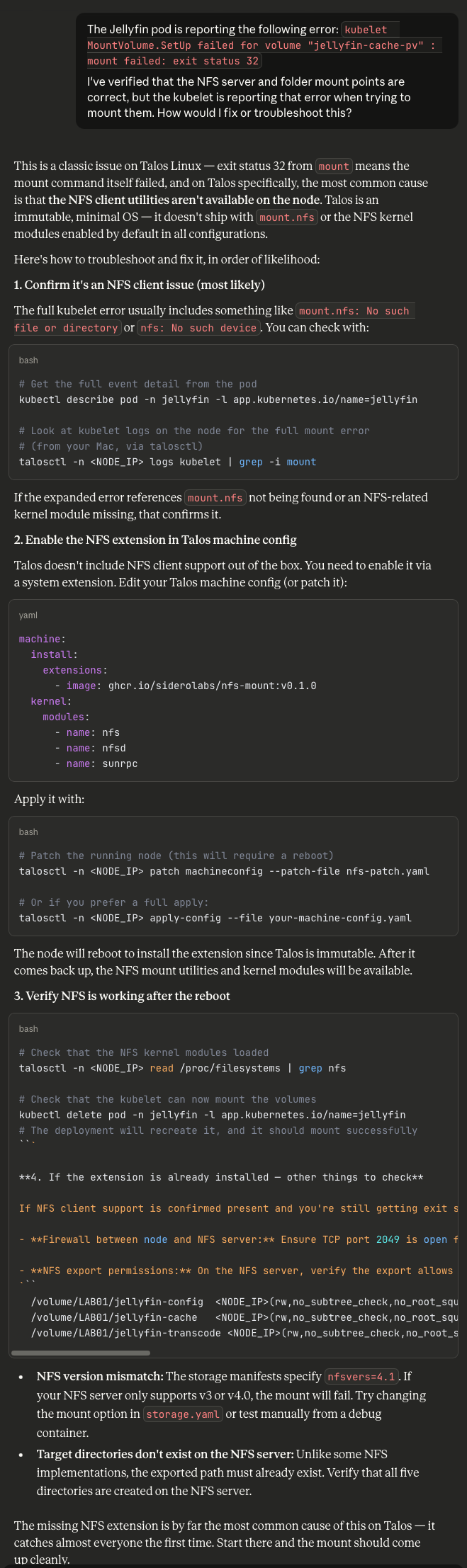
sunrpc in the modules list for Talos.Welp, that did it. Applying the modules in the Talos controlplane.yaml fixed the issue - even though I had specifically built them into the image with Talos Image Factory beforehand.
Ugh.
Anyway, the Jellyfin container is running now and happy, so let's address one more red flag before we soldier onwards.
Stop. Recommending. Bullshit.
Look at the extensions and modules fields in the above image. For no reason whatsoever, Opus 4.6 hallucinates a (deprecated) image extension from Siderolabs in the form of nfs-mount:v0.1.0 (again with the specific versioning!) and a module named sunrpc.
Neither of those are needed to fix NFS. Extensions are deprecated in this format by Sidero, anyway.
The knowledge that someone out there is using Claude to manage production Infrastructure-as-Code via agents is terrifying to me.
But we're almost there - in theory.
Final Stop: Exposure
I'm tired. I'm sleepy. It's been a day.
Two files left: ingress.yaml and service.yaml. Opus 4.6 does not indicate which one goes first, so we'll start with the Service manifest:
# ===========================================================================
# Jellyfin Service
# Exposes ONLY port 8096 (HTTP web UI and API) as a ClusterIP service.
# The ingress controller reverse-proxies external HTTPS traffic to this.
#
# Ports intentionally NOT exposed:
#   8920/tcp  — Jellyfin's built-in HTTPS (unnecessary; TLS terminates at ingress)
#   1900/udp  — DLNA discovery (not routable through ingress; add a separate
#               service with type=NodePort or HostPort if needed on the LAN)
#   7359/udp  — Client auto-discovery (same as above)
# ===========================================================================
apiVersion: v1
kind: Service
metadata:
  name: jellyfin
  namespace: jellyfin
  labels:
    app.kubernetes.io/name: jellyfin
    app.kubernetes.io/component: media-server
spec:
  type: ClusterIP
  selector:
    app.kubernetes.io/name: jellyfin
  ports:
    - name: http
      port: 8096
      targetPort: http
      protocol: TCP
Followed by Ingress:
# ===========================================================================
# Jellyfin Ingress
# - TLS termination via cert-manager + Let's Encrypt
# - HTTP → HTTPS redirect (handled by NGINX Ingress Controller config)
# - WebSocket upgrade support for Jellyfin real-time features
# - Only proxies to port 8096 — no other backend ports exposed
#
# IMPORTANT: Replace "jellyfin.example.com" with your actual hostname.
# ===========================================================================
apiVersion: networking.k8s.io/v1
kind: Ingress
metadata:
  name: jellyfin
  namespace: jellyfin
  labels:
    app.kubernetes.io/name: jellyfin
    app.kubernetes.io/component: ingress
  annotations:
    # --- cert-manager integration ---
    # Switch to "letsencrypt-staging" for initial testing to avoid rate limits
    cert-manager.io/cluster-issuer: letsencrypt-production

    # --- NGINX-specific annotations ---
    # Force HTTPS redirect
    nginx.ingress.kubernetes.io/ssl-redirect: "true"

    # WebSocket support (Jellyfin uses this for SyncPlay, real-time updates)
    nginx.ingress.kubernetes.io/proxy-http-version: "1.1"
    nginx.ingress.kubernetes.io/proxy-set-headers: "Upgrade=$http_upgrade|Connection=upgrade"

    # Long timeouts for streaming connections
    nginx.ingress.kubernetes.io/proxy-read-timeout: "3600"
    nginx.ingress.kubernetes.io/proxy-send-timeout: "3600"

    # Allow large request bodies (subtitle uploads, image uploads)
    nginx.ingress.kubernetes.io/proxy-body-size: "0"

    # Buffering settings for media streaming
    nginx.ingress.kubernetes.io/proxy-buffering: "off"

spec:
  ingressClassName: nginx
  tls:
    - hosts:
        # ===== EDIT THIS VALUE =====
        - jellyfin.example.com
      secretName: jellyfin-tls-certificate
  rules:
    - host: jellyfin.example.com    # ===== EDIT THIS VALUE =====
      http:
        paths:
          - path: /
            pathType: Prefix
            backend:
              service:
                name: jellyfin
                port:
                  number: 8096
And finally, Networkpolicy.yaml:
# ===========================================================================
# NetworkPolicy: Restrict Jellyfin network access
# - Ingress: Only allow traffic from the ingress-nginx namespace on port 8096
# - Egress: Allow DNS resolution + NFS traffic + internet (for metadata fetching)
#
# NOTE: NetworkPolicies require a CNI that supports them (Cilium, Calico, etc.).
# Talos Linux defaults to Flannel, which does NOT enforce NetworkPolicies.
# If you switch to Cilium (recommended for Talos), these policies will activate.
# They are safe to apply on Flannel — they'll simply have no effect.
# ===========================================================================
apiVersion: networking.k8s.io/v1
kind: NetworkPolicy
metadata:
  name: jellyfin-ingress-only
  namespace: jellyfin
  labels:
    app.kubernetes.io/name: jellyfin
spec:
  podSelector:
    matchLabels:
      app.kubernetes.io/name: jellyfin
  policyTypes:
    - Ingress
    - Egress

  ingress:
    # Allow inbound traffic ONLY from the NGINX Ingress Controller
    - from:
        - namespaceSelector:
            matchLabels:
              kubernetes.io/metadata.name: ingress-nginx
      ports:
        - protocol: TCP
          port: 8096

  egress:
    # DNS resolution (kube-dns / CoreDNS)
    - to:
        - namespaceSelector:
            matchLabels:
              kubernetes.io/metadata.name: kube-system
      ports:
        - protocol: UDP
          port: 53
        - protocol: TCP
          port: 53

    # NFS traffic (port 2049) — allow to any destination since NFS server
    # is outside the cluster
    - to:
        - ipBlock:
            cidr: 0.0.0.0/0
      ports:
        - protocol: TCP
          port: 2049

    # HTTPS egress — Jellyfin needs this to fetch metadata, plugin updates,
    # artwork from TMDB/TVDB/MusicBrainz, etc.
    - to:
        - ipBlock:
            cidr: 0.0.0.0/0
            except:
              - 10.0.0.0/8
              - 172.16.0.0/12
              - 192.168.0.0/16
      ports:
        - protocol: TCP
          port: 443
        - protocol: TCP
          port: 80
Done.
Testing Results
In theory, we should have Jellyfin available on our single-node K8s cluster with HTTPS via the NGINX Ingress controller.

At this point, my patience has worn thin, I have no Jellyfin, K8s shows everything looks fine, and I am so tired that text is growing fuzzy.
Thus concludes my first day with premium AI.
Takeaways and Closing Thoughts
On the surface, Opus 4.6 is honestly kind of terrifying to an Enterprise Infrastructure Engineer (looking towards Architecture/Management) like myself: if I was brazen enough to hook Claude Code to my infrastructure APIs directly, I have 100% confidence it could bang out functional infrastructure - eventually. It wouldn't be secure, it wouldn't be efficient, but Enterprises generally do not give a fuck about either of those barring an auditor visit or a need to bump the share price - and it's often just easier to explain why an agent has command over your infrastructure to said auditor than to block it, or to fire a swath of people instead of optimize spend.
Do I think it'll replace my career wholesale? Unless LLMs can be developed to learn in real-time from feedback and coaching, probably not. A lot of infrastructure is "in the moment" learning and teaching with a healthy dose of institutional knowledge, which AI cannot (presently) do. It excels at brute force attacking a problem, less so at detailed troubleshooting - at least based on this single project. Even if they did develop spontaneous learning of information and facts, the limitation of context windows means they'll always lack the sum total of human experience in their output, in favor of what's statistically the most probable outcome given the input. It arguably helps us humans that we suck at documentation; these things would thrive on it.
Even so, I can see why the AI researchers, software developers, and boosters rant and rave about these things: they're genuinely impressive to behold. Claude made rookie mistakes while carrying itself like a seasoned architect, and that confidence can mislead susceptible folks into blindly trusting it. It's an amazing power tool, but it's all too easy to cut your fingers off screwing around with it.
It also reaffirms my own concerns about AI: this thing is going to fuck up society, regardless of whether it succeeds or fails. Given the present lack of a societal contract in the West, this is Capital's proposal for a new one: we keep the money, and the power, and the means of production (AI/tokens), and you get nothing. For folks currently riding high on personal successes as a result of their early adoption of AI tooling, this may seem like the ride will go on forever, that they've entered the vaunted Capital classes; rest assured, you too will be consumed like the rest of us, and we all need to come up with something better, now.
One other tidbit: I am profoundly tired. It wasn't just rehashing my K8s knowledge by manipulating the AI bot and troubleshooting its output, it was general fatigue at having to understand this agent of chaos and why it reached the decisions it did, dealing with irreconcilable idiosyncrasies all the while (STOP. VERSIONING. SHIT.). The claims of AI being an energy vampire definitely feel real, just a scant few hours after using it for the first time. I am wiped.
Four hours of Opus 4.6. No Jellyfin. No Claude Code usage. A lot of learned lessons.
I am still pessimistic on the economics of all this, the systems it will disrupt, the changes ahead - but I cannot deny the sheer impressiveness of these rock-bangers.
Postscript: Morning Clarity
I didn't want to simply abandon this half-cocked and half-assed, even if I don't intend to keep the Talos K8s node past this project. I really wanted Jellyfin to work, so I could at least poke at it before migrating to a more permanent (and maintainable) deployment in Podman or Docker later.
So, I refreshed Claude and asked it why I was getting a 404 error. Again, trusting it to debug its own mess.
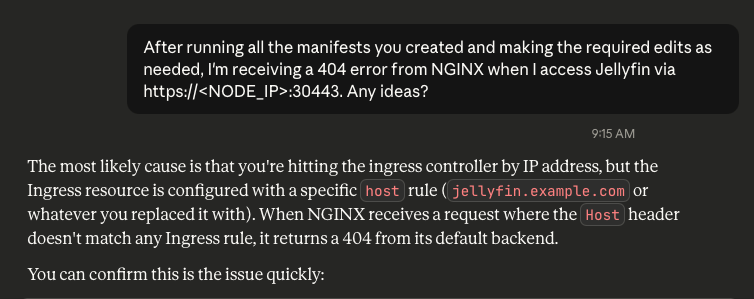
Sigh. I had a feeling it was DNS.

One hop into the Pi-Hole GUI to create a local A record for the FQDN I'd put down for Jellyfin, and I had access to the dashboard to complete setup.
So, yeah. Banging rocks together worked. Eventually, and with a lot of experience tempering its wild abandon. I have the thing, but I lack any practical knowledge of how it's really been deployed or architected, and thus cannot effectively support or maintain it without dedicating far more time learning and understanding what the bot did and why, than I would've doing it myself from the get-go. Technical debt has shifted forward in time, banking on a continued AI subscription to troubleshoot it as necessary - assuming whatever you're trying to fix was included in the last training data set.
My role as a consumer of Infrastructure-as-Code Engineer can be replaced by a bot banging rocks together in a datacenter, provided my employer doesn't care about security, efficiency, stability, or sanity.
Which I guess means it's a good thing I've spent the past half decade working on my leadership skills rather than padding my technical certifications. Foundational knowledge and the ability to guide or direct is now exponentially more valuable than deep technical knowledge, at least if brute force is an option where you work.
I'm not keeping this shitshow, though. Opus 4.6 got me Jellyfin, eventually, twelve hours later than writing my own Docker Compose would've accomplished and with far more scaffolding than necessary. That knowledge comes from having done the work in the first place.